






Let’s be honest — most software updates feel like a chore. You click “install,” restart your machine, and wonder what, if anything, actually changed. But Microsoft’s April 2026 Security Update for Windows 11 is a little different. It’s not trying to wow you with flashy new features. Instead, it quietly fixes the things that have been quietly annoying you — and that, in its own understated way, is worth paying attention to.
The rollout is expected to begin Tuesday, April 14, 2026, and covers both Windows 11 versions 25H2 and 24H2. Here’s what’s actually in it.
1. Smart App Control Finally Stops Being So Stubborn
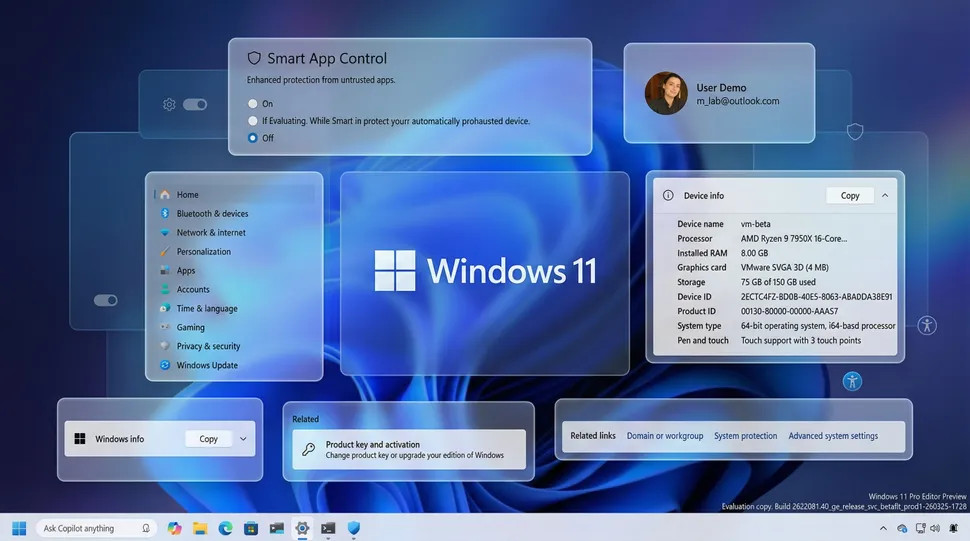
If you’ve ever tried to turn Smart App Control on or off and been told you’d need to reinstall Windows to do it — you’re not alone, and you weren’t imagining how absurd that was.
That changes with this update. Smart App Control can now be toggled directly from Windows Security > App & Browser Control > Smart App Control, no reinstallation required. It’s the kind of fix that should have existed from day one, but better late than never.
2. Windows Narrator Gets Smarter — For Everyone
Narrator’s ability to describe images using AI was previously locked to Copilot+ PCs. Now it’s opening up. Instead of relying on a local AI model, the feature will use Copilot to generate image descriptions — meaning far more users can benefit from it.
Use Narrator key + Ctrl + D to describe a focused image, or Narrator key + Ctrl + S for a full-screen description. A genuinely useful accessibility step forward.
3. The Settings Home Page Gets a Little More Sensible
Nothing dramatic here — but the Device info card has been cleaned up to be easier to read at a glance, and the Home page now loads faster. There are also reliability improvements when downloading updates through Settings > System > Advanced. Small things, but they add up.
4. The About Page Finally Shows What You Actually Need
Here’s a welcome reversal: Microsoft is bringing back the top hardware spec cards on the About page — processor, memory, graphics, and storage — after previously removing them. And they’re adding graphics and storage details to the Device info section.
It’s the kind of information that should have always been right there. Glad it’s back.
5. Accounts Section Gets an Upgrade Nudge (That You Can Dismiss)
If you have a Microsoft 365 Family plan linked to your PC, you’ll now see an upgrade option in the Accounts section. Not everyone will want this, and if you don’t, you can turn off suggested content in Settings to make it go away. Also in this section: the dialog for changing account type on the “Other users” page has been refreshed to match Windows 11’s design language.
6. Pen Settings Get a New Trick
A smaller change, but worth noting: the Pen settings page now lets you configure the pen button to open the same app as the Copilot key — a “Same as Copilot key” option. Handy if you use a stylus and want things to feel consistent.
7. File Explorer Gets Some Quiet Love
No visual overhaul here, but a few changes that’ll make daily use smoother:
- You can now use Voice Typing to rename files — a genuine time-saver
- A frustrating white flash bug when opening new tabs or resizing elements has been fixed
- Unlocking files downloaded from the internet is now more reliable, making previews easier
These are the kinds of fixes that make you go “oh, that’s what was happening.”
8. Display and Refresh Rate Support Gets Serious
For those with high-end monitors, this update brings meaningful improvements. Windows 11 can now recognize displays reporting 1000Hz or higher refresh rates. If you’re using a native USB4 monitor connection, the controller will drop to its lowest power state during sleep to save battery. Auto-rotation after waking from sleep should also behave more reliably, and HDR performance has been improved for monitors with non-compliant DisplayID 2.0 blocks.
The Bigger Picture
This isn’t the kind of update that earns a product launch event. But it’s exactly the kind that earns trust. Microsoft isn’t trying to reinvent Windows 11 here — they’re doing the slower, harder work of making it feel stable, predictable, and genuinely pleasant to use every day.
If they keep building updates like this — careful, useful, and respectful of the user’s time — Windows 11 might finally become the polished OS it always promised to be. It’s not exciting. But it’s progress. And sometimes, that’s the best thing an update can be.
Author