







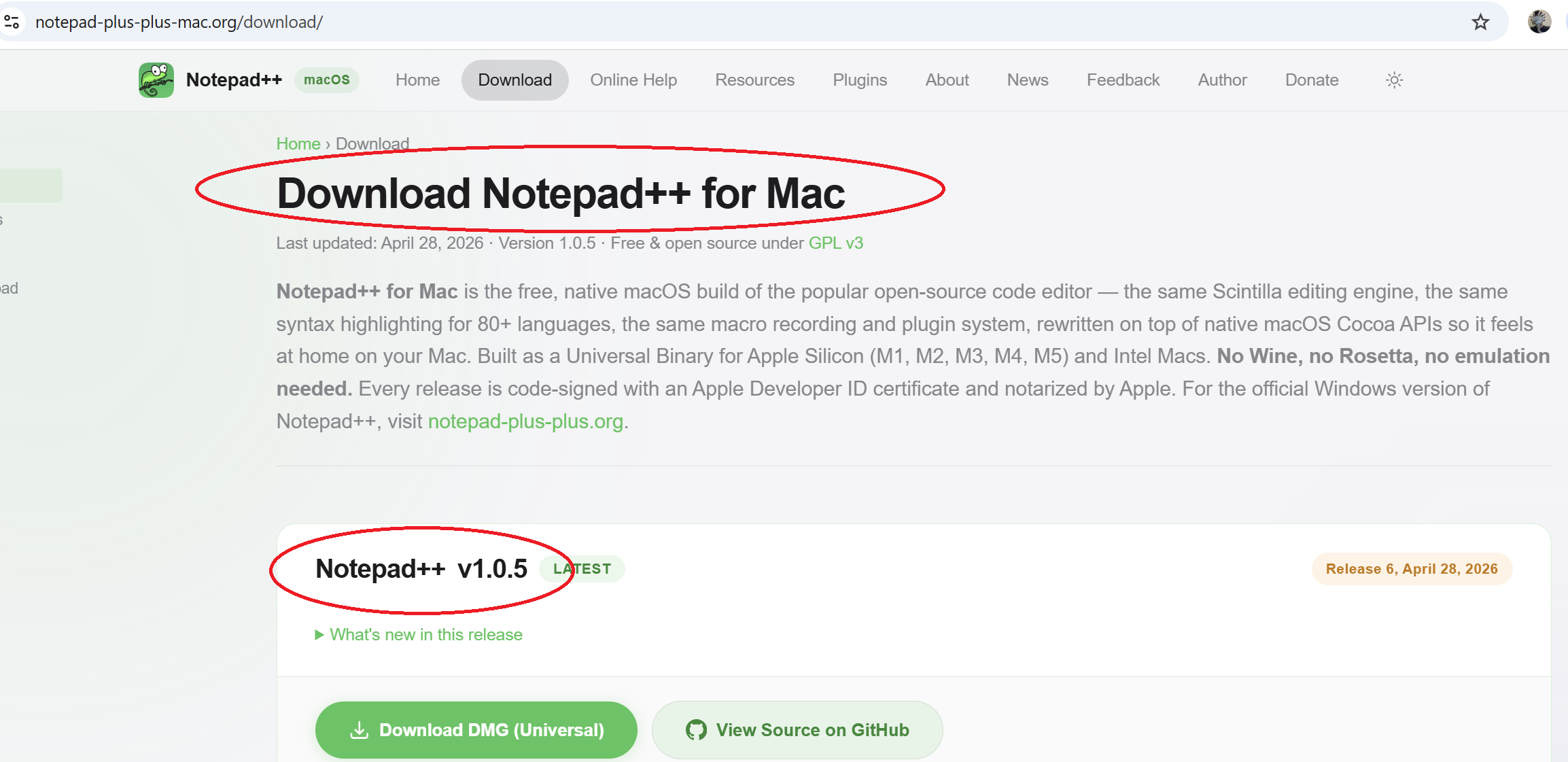
Fake Notepad++ for Mac is the latest digital trap catching unsuspecting users off guard. A deceptive website claiming to offer a native macOS version of the popular Notepad++ code editor has been making the rounds online, and it has already convinced not only ordinary users but also some tech publications that the long-awaited Mac release has finally arrived. The truth is far more troubling.
A Convincing Imitation
The site in question operates under the domain notepad-plus-plus-mac[.]org. At first glance, it looks like a polished, official extension of the real Notepad++ project. It mirrors the familiar Notepad++ name, the iconic green color scheme, and the well-known chameleon logo associated with the genuine Windows-based editor.
The homepage prominently advertises “Notepad++ for Mac” as a complete native port designed for both Apple Silicon and Intel Macs. The marketing language goes a step further by claiming “no Wine, no emulation,” positioning the app as the long-anticipated macOS version of a tool many developers have wanted for years.
For someone unfamiliar with the actual project’s history, the design and language are convincing enough to make the entire setup seem legitimate. Unfortunately, that is exactly the problem.
Notepad++ Has Never Released a Mac Version
The reality is that Notepad++ remains a Windows-only editor. There is no official macOS release, and the genuine development team has not endorsed any Mac version. Don Ho, the founder of Notepad++, has issued a clear public warning about the impersonating site.
In an alert titled “Trademark Violation: Fake Notepad++ for Mac,” Ho stated that the macOS offering “has no connection to Notepad++,” is “not authorized, not endorsed, and not affiliated with the project in any way.” He explained that even if the underlying code is based on the open-source Notepad++ repository, the way the site presents itself crosses ethical and legal lines.
Ho stressed that very few users read disclaimers carefully. Most people simply trust what they see, click download, and install the application without realizing they are getting an unofficial product.
Why the Site’s Design Is So Misleading
The fake site goes to extraordinary lengths to appear authentic. Some of the most concerning elements include:
- Use of the Notepad++ name without permission
- The chameleon logo associated with the original project
- Branding language that mimics official Windows release announcements
- Claims of native Apple Silicon and Intel Mac support
- A supposed “Authors” page featuring Don Ho’s name and biography
That last point is especially alarming. By listing Ho alongside the developer of the alleged macOS port, complete with his photo and biography, the site strongly implies that he is part of the project or has personally approved it. He has not.
Ho has publicly called this misleading, inappropriate, and disrespectful to the Notepad++ community and its longtime users.
Confusion Spreads Across the Web
The situation has been made worse by articles, social media posts, and forum threads excitedly announcing that “Notepad++ has finally come to Mac.” Many of these posts link directly to the impersonating domain, sending unsuspecting readers straight to the fake website.
In other words, the deception is being amplified by people who genuinely believe they are sharing good news. By the time users realize the source is unofficial, they may already have downloaded and installed the application.
Why This Is a Major Security Concern
From a cybersecurity perspective, the danger here goes far beyond a simple branding dispute. When users download software believing it is from a trusted source, they let down their natural guard. They install the app, grant permissions, and trust it on their system. That trust becomes a vulnerability.
Even if the current build of the fake Notepad++ for Mac is not malicious today, the situation could change at any time. A few of the biggest risks include:
- Future updates that include backdoors or spyware
- Hidden remote access tools embedded into newer versions
- Theft of saved files, credentials, or developer secrets
- Misuse of system permissions granted during installation
- Use of the trusted “Notepad++” name to deliver other unrelated malware
This is exactly the kind of attack vector cybercriminals love, where users themselves become the unwitting installers of malicious software, simply because they believe they are getting an official tool.
Apple Notarization Doesn’t Mean Safety
The fake site advertises that the app is signed and notarized by Apple. While that may sound reassuring, it doesn’t actually guarantee that the software is safe.
Apple notarization simply confirms that:
- The developer has registered with Apple
- The app passed an automated check at one specific point in time
- It does not contain known malware at the moment of notarization
It does not mean Apple has approved the app, vouched for its long-term safety, or endorsed its purpose. Notarization is a baseline check, not a stamp of trust.
This distinction matters because once users associate notarization with safety, they may continue downloading suspicious software simply because it carries that label.
A Future Risk for Developers
Code editors like Notepad++ are often used by developers, system administrators, and IT professionals. These users handle sensitive tasks ranging from corporate scripting to source code editing. Compromising one of their daily tools is a goldmine for threat actors.
If a fake Notepad++ for Mac becomes widely used, attackers could later push trojanized updates and gain access to:
- Source code repositories
- Developer credentials
- API keys and configuration files
- Internal network resources
- Company-related sensitive documents
That makes this fake project not only a consumer issue but a potential supply chain risk for businesses where Mac users are involved in software development.
What Don Ho Has Done So Far
Don Ho has not stayed silent. According to his statements, he has:
- Contacted the site owner demanding changes to the misleading branding
- Publicly issued a trademark violation notice
- Reserved the right to pursue legal action if no action is taken
- Warned users that the site is not affiliated with the official project
He has also encouraged the Notepad++ community to share the warning and report misleading articles or posts that promote the fake Mac release as if it were official.
How Users Can Stay Safe
If you’ve come across the fake site or are considering downloading any tool labeled “Notepad++ for Mac,” there are clear steps you can take to protect yourself:
- Avoid downloading from notepad-plus-plus-mac[.]org or any similar look-alike domain
- Always use the official site at notepad-plus-plus[.]org for genuine releases
- Treat any Mac version of Notepad++ as unofficial unless explicitly announced by Don Ho
- Use trusted code editor alternatives for macOS, such as Visual Studio Code or other established IDEs available through their official websites or the Mac App Store
- Keep your endpoint protection up to date and run regular system scans
For developers, an extra layer of caution is wise. Avoid installing unfamiliar tools on machines that handle production code, sensitive credentials, or company resources.
What to Do If You’ve Already Installed It
If you’ve already installed the fake Notepad++ for Mac, security experts recommend taking the following actions immediately:
- Remove the application from your system
- Revoke any permissions granted to the app, including file or network access
- Run a full antivirus and endpoint protection scan
- Change passwords for any sensitive accounts accessed during the time the app was installed
- Monitor your system for any suspicious behavior in the days that follow
Acting quickly is important. Even if no harm has been done yet, leaving an unverified application installed leaves the door open for future malicious updates.
Helping the Wider Community
Misinformation spreads quickly when it sounds like good news. If you come across articles, tutorials, or social media posts celebrating “Notepad++ for Mac,” consider stepping in. Politely correct the post, link to the official Notepad++ site, and share Don Ho’s trademark warning. The more people understand the situation, the harder it becomes for the fake site to deceive new users.
A Final Word for Mac Users
The fake Notepad++ for Mac highlights a much bigger truth about modern cybersecurity. Threats today rarely arrive in obvious forms. They come dressed up as familiar tools, friendly logos, and trusted brands. They rely on excitement, convenience, and the natural assumption that what looks official actually is.
For now, Notepad++ remains a Windows-only project. Until that changes through an announcement from Don Ho himself, any “Mac version” of Notepad++ should be treated with caution. Whether you’re a casual user or a seasoned developer, downloading from the wrong source can compromise far more than just one application.
In a world where attackers blur the line between real and fake, the safest move is always the simplest one. Stick to verified sources, double-check the URL, and remember that not everything wearing a familiar logo deserves your trust.
Author