





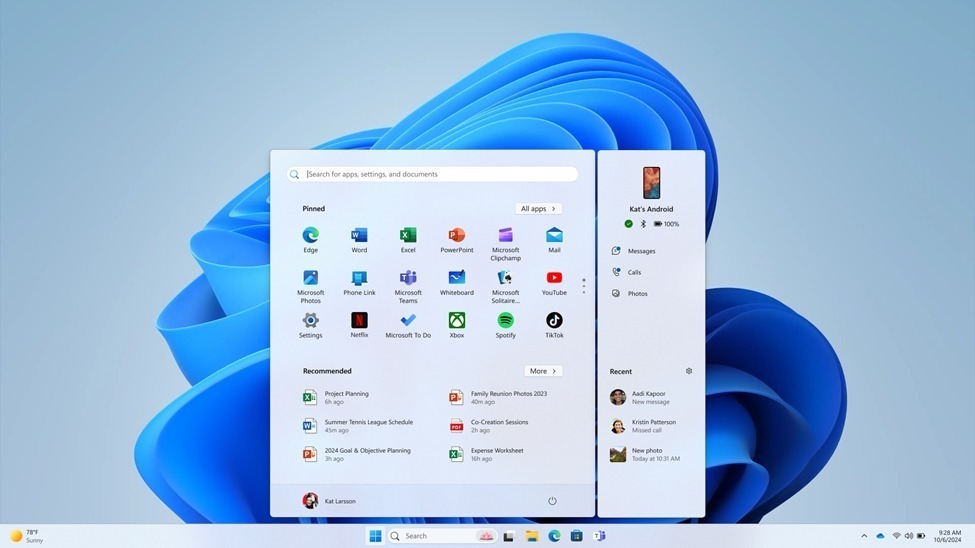
Windows 11 Start menu customization is finally getting the serious attention users have been asking for. Microsoft has confirmed that a wave of new options is on the way, giving people far more control over how the Start menu looks and behaves — including the ability to switch off specific sections, resize the menu, and hide personal account details.
A Course Correction Years in the Making
The Start menu has been a sore point ever since Windows 11 launched in 2021. Its rigid layout and a “Recommended” section that many users found intrusive drew steady criticism, and for a long time Microsoft seemed reluctant to budge.
That appears to be changing. This week, Microsoft rolled out a new Windows 11 preview build that introduced two features users had been requesting for roughly half a decade: a movable taskbar and the ability to make it smaller. It was a welcome step — but in a post on the official Windows Blogs site, Microsoft made clear it isn’t finished. The company says more Start menu improvements are coming, and they go well beyond minor tweaks.
Section-Level Toggles for a Modular Menu
One of the headline changes is that the Start menu is becoming modular. Instead of being stuck with a fixed layout, users will be able to turn off individual sections entirely.
That means you’ll be able to disable the parts you don’t use — whether that’s pinned apps, the recommendations feed, or the full list of all apps. For anyone who prefers a stripped-down, minimalist launcher, this is a significant shift. If you never look at recently opened files, for example, that section can simply disappear, freeing up space or letting the menu shrink to fit.
Smarter Control Over Recommendations
Another fix addresses a long-standing annoyance. Currently, while Windows 11 does let you turn off recommendations in the Start menu, doing so also switches off jump lists and recent files in File Explorer — an odd and unwanted side effect.
Microsoft is untangling that behavior. Soon, you’ll be able to remove recommendations from the Start menu without losing jump lists or recent files elsewhere in the system. It’s a small change on paper, but one that removes a frustrating trade-off many users have quietly put up with.
A Resizable Start Menu
The size of the Start menu has been another common complaint. At the moment, how large it appears depends on your screen size and DPI scaling, which isn’t always convenient. On smaller laptops in particular, the menu can feel enormous relative to the screen.
To address this, Microsoft is adding the ability to switch between small and large layouts. Rather than relying on a single size that adapts automatically to your display, you’ll be able to pick the layout you prefer and have it stay that way. The small option recalls the denser, more compact feel of older designs, while the large layout suits bigger or touch-friendly screens.
Hiding Account Details for Privacy
Microsoft is also adding a privacy-focused option: the ability to hide your username and profile picture from the Start menu.
This is a thoughtful addition for anyone who regularly shares their screen, records tutorials, streams, or takes screenshots. Instead of having personal account information visible to everyone watching, you’ll be able to keep it out of view — a simple but genuinely useful tweak for content creators and privacy-conscious users alike.
Better, More Relevant File Suggestions
Beyond layout controls, Microsoft is refining the content inside the Start menu itself. The company has promised improved file recommendations, so the menu surfaces files that are actually relevant and useful rather than generic suggestions.
There’s also a naming change. The “Recommended” section is being renamed to “Recent,” a label that more accurately reflects what the area mostly shows — recently used items rather than algorithmic picks.
When Can You Try It?
If these changes sound appealing, the wait shouldn’t be long. Microsoft says all of these features will be available for testing within the next few weeks through upcoming Windows 11 preview builds, meaning Windows Insiders will get hands-on access first before any wider rollout.
It’s worth remembering that preview builds are testing grounds. Features can change, get delayed, or occasionally be pulled before reaching the stable version of Windows 11. Still, the fact that Microsoft has publicly committed to these improvements is encouraging.
Why This Matters
Taken together, these updates point to a broader shift in how Microsoft is treating Windows 11. The Start menu and taskbar are among the most-used parts of any PC, and years of feedback have centered on the same specific requests: let me move the taskbar, let me shrink the menu, and stop forcing recommendations on me.
With movable and resizable taskbar options already arriving, and section toggles, a resizable menu, privacy controls and smarter suggestions on the way, Microsoft appears to be listening at last. For longtime Windows 11 users who have felt the interface was built around Microsoft’s priorities rather than their own, this round of Windows 11 Start menu customization is a meaningful and overdue step toward making the desktop feel personal again.
Author