





The Virtual OS Museum is one of those rare passion projects that feels like stumbling across a hidden treasure chest. For anyone who has ever been curious about what computing looked and felt like in the early days of Apple, NeXT, or the countless other platforms that shaped our digital world, this remarkable archive offers a chance to actually experience them—not just read about them in dusty textbooks.
A Massive Archive of Computing History
Created by developer Andrew Warkentin and recently highlighted by BoingBoing, the Virtual OS Museum is an ambitious emulation project that bundles together more than 1,700 pre-installed operating systems and standalone applications. The collection spans over 250 platforms and roughly 600 distinct operating systems, with software dating all the way back to 1948 and stretching into the modern era.
This isn’t just a casual hobby project either. Warkentin has been quietly building this archive for more than two decades, beginning his collection back in 2003 when emulator images and software documentation were scarce online. What started as a personal effort has grown into one of the most comprehensive computing history archives ever assembled.
Two Versions to Choose From
The project comes in two flavors, depending on how much storage space and patience you have:
- The full edition weighs in at a hefty 121GB download (174GB once unzipped), with every operating system and emulator pre-loaded for offline use.
- The lite version is much lighter at 14GB (21GB unzipped) and pulls down individual virtual machine images the first time you launch them.
Both editions support automatic and manual updates, meaning newly added systems can be downloaded without needing to re-fetch the entire library. It’s a thoughtful design choice that keeps the archive current without forcing users to start from scratch.
What’s Inside the Collection
The sheer breadth of what’s included is genuinely staggering. The project covers nearly every major era and category of computing history, from primitive mainframes to modern mobile platforms.
Some highlights include:
- Early mainframes: Manchester Baby demonstrations, Mark 1 Scheme A/B/C/T (among the earliest pieces of software that could be considered operating systems), and a variety of EDSAC programs.
- Later mainframes and minicomputers: CTSS, MVS, VM/370, TOPS-10 and TOPS-20, ITS, Multics, RSX, and RSTS.
- Workstations and Unix variants: PERQ operating systems, SunOS, IRIX, OSF/1, A/UX, NeXTSTEP, Plan 9, multiple BSD distributions, and Linux distros from across the decades.
- Home computers: Numerous CP/M variants, Apple II, Commodore 8-bit machines, Atari 8-bit systems, MSX, Tandy TRS-80, BBC Micro, ZX Spectrum, and Sharp MZ.
- Personal computer operating systems: Various DOS flavors, OS/2, BeOS, Windows from version 1.0 all the way through early Longhorn betas, plus classic Mac OS through Mac OS X 10.5 on PowerPC.
- Mobile and embedded platforms: PalmOS, EPOC/Symbian, Windows CE, Newton OS, early Android and iOS versions where emulation allows, and QNX.
- Research and obscure systems: ZetaLisp, various Smalltalk environments, Oberon, Plan 9, and many other systems that very few people alive today have ever booted.
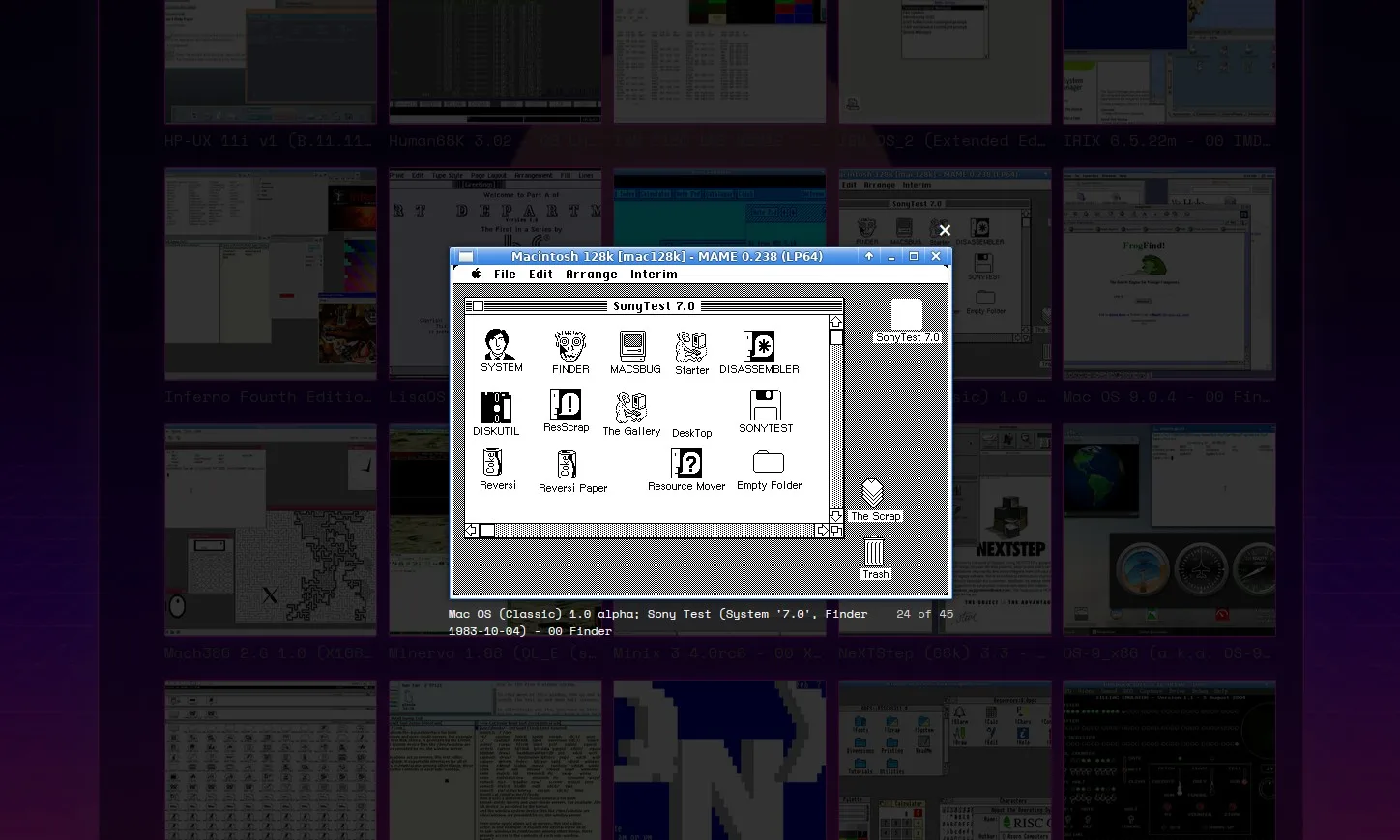
For Apple enthusiasts in particular, the inclusion of classic Mac OS, A/UX, NeXTSTEP, and early Mac OS X versions is a goldmine. These platforms played pivotal roles in shaping the modern Mac experience but have largely faded from everyday use.
A Window Into Forgotten Computing Eras
What makes this project particularly compelling is how it preserves not just famous operating systems but also the obscure ones that historians and computer scientists rarely get to discuss outside academic circles. Systems like Oberon and various Smalltalk environments influenced modern programming languages and graphical interfaces, yet most people have never seen them firsthand.
By making these available in an easy-to-run package, the Virtual OS Museum offers something invaluable: hands-on access to the actual software that shaped how we interact with computers today.
Caveats Worth Knowing
Warkentin is upfront about the fact that this is still a preliminary release, and not every emulated system will behave flawlessly. Some operating systems only function correctly under specific emulator versions, so a bit of trial and error may be required for the more obscure entries.
There’s also a notable limitation regarding hardware compatibility. The host virtual machine is currently x86-only, which means users on ARM-based systems will see significantly reduced performance. This is particularly relevant for anyone running Apple silicon Macs—performance there may feel sluggish compared to traditional Intel-based PCs running Windows or Linux.
Despite these rough edges, the project remains an impressive achievement and a fascinating playground for anyone interested in computing history.
How to Get Started
If you’re ready to dive in, the Virtual OS Museum website provides everything you need to get rolling, including:
- Direct download links for both the full and lite editions
- Quick-start guides tailored for macOS, Windows, and Linux users
- A complete catalog of every operating system included in the archive
- Screenshots showing various systems already booted up and running
Whether you want to relive the experience of using a System 7 Mac, explore the elegant design of NeXTSTEP that eventually became the foundation for macOS, or simply marvel at how far computing has come since the days of EDSAC, the museum has something for everyone.
Why Projects Like This Matter
In an industry obsessed with constant forward motion, efforts like the Virtual OS Museum serve as critical reminders of where we came from. Operating systems aren’t just utilities—they’re snapshots of how humans thought about technology at specific moments in history. Each interface, each design decision, each quirky limitation tells a story about the era that produced it.
Andrew Warkentin’s two-decade dedication to preserving these stories is the kind of work that often goes unappreciated until projects like this surface. For students, developers, retro computing fans, or anyone with even a passing curiosity about how we got here, the Virtual OS Museum is well worth exploring.
Pay a visit to the project’s website, pick whichever edition suits your storage situation, and prepare to lose a few hours wandering through the digital equivalent of a computing history hall of fame.
Author