






Apple Unveils New Accessibility Features Powered by Apple Intelligence
Apple accessibility features are about to take a significant leap forward. The company has previewed a wide range of updates that lean on Apple Intelligence to make everyday tools smarter, more intuitive, and more personal, while keeping privacy at the center of the experience.
Most of these features are expected to arrive later this year, and they touch nearly every Apple device, from iPhone and iPad to Mac, Apple TV, and Apple Vision Pro.
Apple’s Vision for Accessible Technology
Apple has long treated accessibility as a core priority rather than an afterthought, and the company’s leadership echoed that point.
CEO Tim Cook said Apple’s approach to accessibility stands apart from anyone else’s, adding that Apple Intelligence brings powerful new capabilities to these tools while preserving the company’s foundational commitment to privacy by design.
Sarah Herrlinger, Apple’s senior director of Global Accessibility Policy and Initiatives, described the updates as new and intuitive options for input, exploration, and personalization, all designed to protect user privacy at every step.
Smarter Sight Tools: VoiceOver and Magnifier
For users who are blind or have low vision, VoiceOver and Magnifier already describe onscreen content and physical surroundings. Apple Intelligence makes both noticeably more capable.
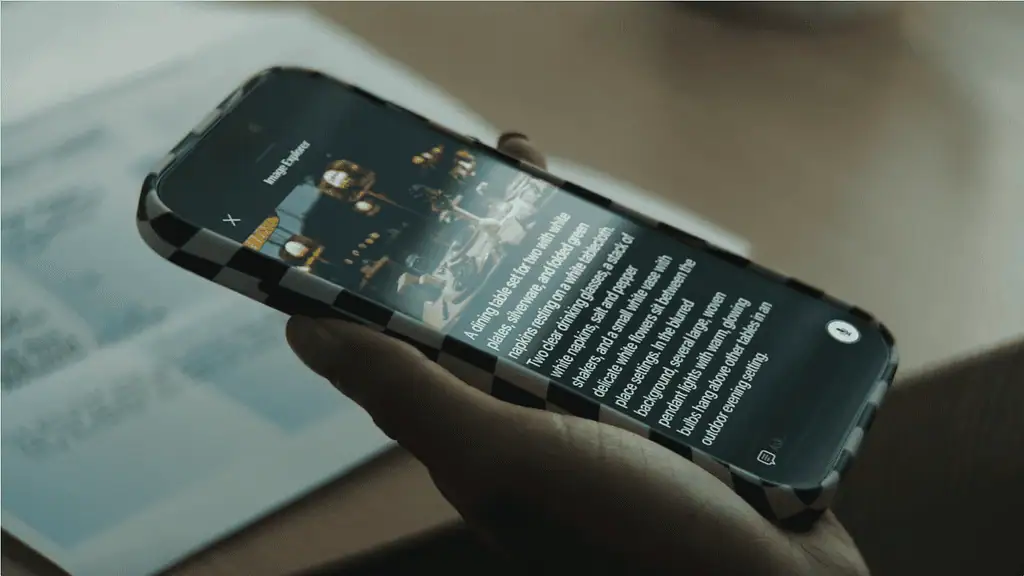
VoiceOver gains an Image Explorer feature that delivers richer, more detailed descriptions of images across the system, including photographs, scanned bills, and personal records. An update to Live Recognition lets users press the Action button on iPhone to ask a question about whatever the camera is pointed at, and then ask follow-up questions in their own words for more detail.
Magnifier brings that same assistive exploration into a high-contrast interface built for low vision. It also works with the Action button for quick questions and can be controlled with spoken commands such as “zoom in” or “turn on flashlight.”
Voice Control Learns Natural Language
Voice Control, which lets people with physical disabilities operate an iPhone or iPad entirely by voice, is becoming far more intuitive.
A new flexible input option means users no longer need to memorize exact button labels or numbers. Instead, they can simply describe what they see. Commands like “tap the guide about best restaurants” or “tap the purple folder” work naturally, even in visually complex apps like Maps or Files. This “say what you see” approach also helps when app elements are not properly labeled for accessibility.
Accessibility Reader Handles More Complex Content
Accessibility Reader provides a customized reading experience for users with conditions ranging from dyslexia to low vision, and Apple Intelligence expands what it can do.
The tool can now handle more demanding source material, such as scientific articles with multiple columns, images, and tables. Key additions include:
- On-demand summaries that give readers an overview of an article before they dive in.
- Built-in translation that lets users read text in their native language while keeping their custom formatting, fonts, and colors.
Automatic Subtitles for Any Video
Captions are increasingly common, but spoken dialogue in personal videos often goes untranscribed. Apple’s new generated subtitles aim to close that gap.
When a video lacks captions, the system can automatically display a transcription of its spoken audio. This works for clips recorded on iPhone, videos shared by friends and family, and streamed content. Because the speech recognition runs on-device, subtitles are generated privately and appear automatically across iPhone, iPad, Mac, Apple TV, and Apple Vision Pro. Their appearance can be customized in the playback menu or in Settings.
Controlling a Wheelchair With Apple Vision Pro
One of the most striking new features uses Apple Vision Pro’s precision eye-tracking to help people operate power wheelchairs.
For some users, a traditional joystick is not an option, making alternative drive controls essential for independent movement. The new feature offers a responsive, eye-driven input method, and notably, Vision Pro’s eye tracking does not require frequent recalibration and works across varied lighting conditions.
The feature launches with the Tolt and LUCI alternative drive systems in the U.S., supporting both Bluetooth and wired connections, with plans to expand to more systems over time.
The response from the disability community has been warm. Pat Dolan, founder of GeoALS and a Team Gleason patient advisory board member who has lived with ALS for a decade, called the ability to control his own wheelchair invaluable. Team Gleason CEO Blair Casey praised the use of Vision Pro’s eye tracking as a major step forward for power wheelchair users.
The Hikawa Adaptive Accessory Goes Global
Alongside the software news, Apple highlighted hardware. The Hikawa Grip & Stand for iPhone, an adaptive MagSafe accessory, is now available worldwide on the Apple Store online in three new colors.
Designed by Los Angeles-based designer Bailey Hikawa in collaboration with people who have a range of disabilities affecting grip, strength, and mobility, the accessory helps users hold an iPhone in whatever way works best for them. Through a new collaboration between Hikawa and PopSockets, it is reaching a global audience for the first time.
Apple is also hosting a Today at Apple session on May 20 at Apple The Grove in Los Angeles, featuring Hikawa, author Shane Burcaw, and actor Alex Barone, to explore the iPhone’s role as assistive technology.
More Accessibility Improvements on the Way
Apple also outlined a number of additional updates across its platforms:
- Vehicle Motion Cues are coming to visionOS to help reduce motion sickness for Vision Pro passengers, along with face gestures and improved Dwell Control eye selection.
- Touch Accommodations offer a new way to personalize setup in iOS and iPadOS.
- Made for iPhone hearing aids will pair and hand off between Apple devices more reliably.
- Larger Text support is arriving on tvOS for viewers with low vision.
- Name Recognition, which alerts deaf or hard-of-hearing users when someone says their name, now works in more than 50 languages.
- A new API lets developers add a human sign language interpreter to a FaceTime call.
- The Sony Access controller can now connect as a game controller on iOS, iPadOS, and macOS, with extensive customization options.
The Bottom Line
This latest wave of Apple accessibility features shows how artificial intelligence can make assistive technology more capable without compromising privacy. From smarter image descriptions and natural language voice control to eye-driven wheelchair control on Vision Pro, these updates are designed to give users more independence in their daily lives. Most arrive later this year, marking another meaningful step in Apple’s long-running accessibility work.
Author